Skip to content
NeoMath

Book-quality equations, without the effort.

Write math in seconds and deliver to print, the web and Word with the same standard of quality.

Windows, macOS and Linux · English, Portuguese and Spanish

The problem

Badly made equations are expensive

  • The equation comes out crooked

    Swapped fonts, wrong spacing and misplaced symbols only show up in the printer's proof.

  • Every fix becomes rework

    Changing one symbol means redoing the image and rechecking the whole chapter.

  • Everyone writes differently

    Authors, editors and designers use different tools, and the book loses its unity.

In the end, time meant for content goes into repairing equations.

NeoMath fixes that: you write, it takes care of the finish.

The solution

Everything an equation needs, in one place

NeoMath is designed for people who write a lot of math: teachers, authors and editorial teams.

Write

Build the equation by clicking or typing

The side palette gathers fractions, roots, sums, matrices, arrows, Greek letters and symbols, with search, favorites and recents. Each template shows its real preview before it goes in.

  • Visual, LaTeX and MathML modes on the same screen
  • Several equations open in tabs
  • Command palette with Ctrl+K and shortcuts you can change
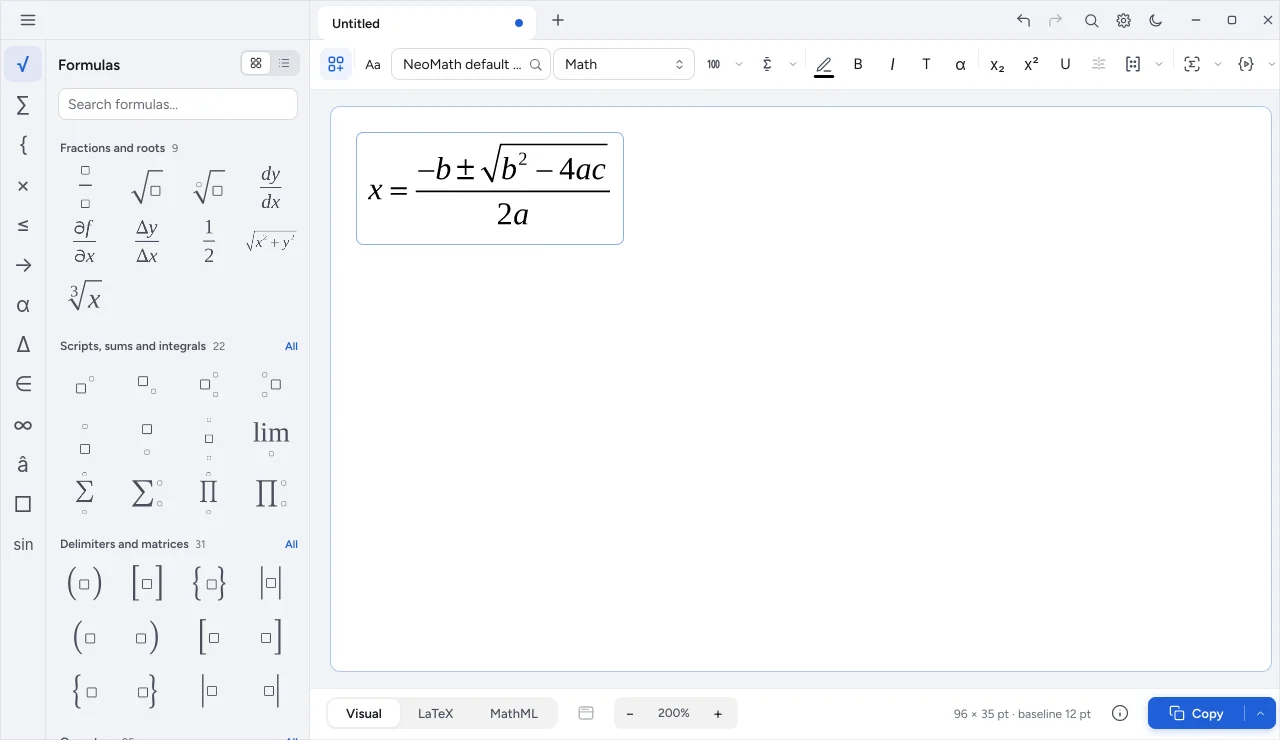
NeoMath formula palette with favorites and categories
Deliver

A ready file for every destination

Deliver vector files for print and images for the web and presentations. Open it again in NeoMath and pick up where you left off.

  • Vector format with exact CMYK color for the printer
  • Files that turn back into editable equations
  • LaTeX and MathML to copy and paste
Standardize

Your publisher's standard in every equation

Set fonts, sizes and spacing once and apply them to a whole folder, including files that already exist. Before saving, a preview shows what will change.

  • Any font installed on the computer
  • Text color in RGB or CMYK
  • Backup and undo
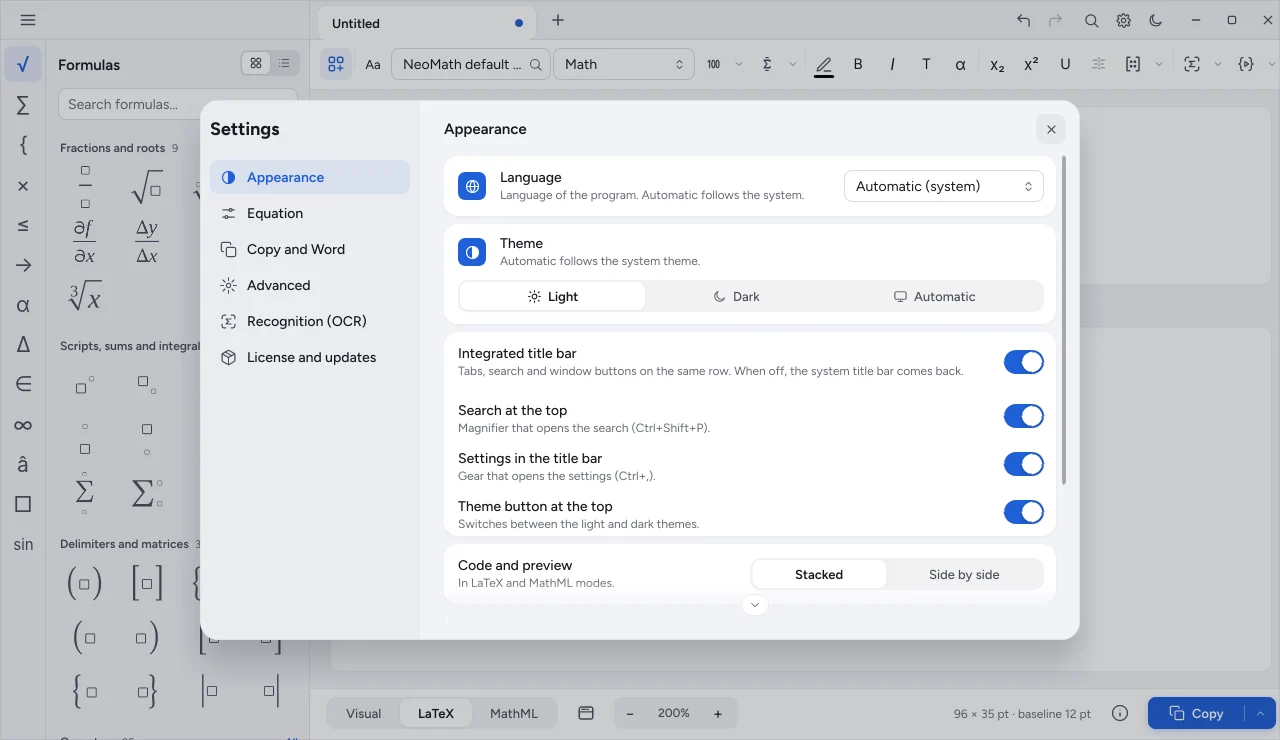
NeoMath settings with appearance, equation and advanced
Integrate

From the editor to Word and InDesign

On Windows, Ctrl+Enter sends the equation to the open Word document and Ctrl+Shift+W brings the selected one back. In InDesign, the equation arrives linked and updates when you save in NeoMath.

  • NeoMath tab in Word and add-in for Mac and web
  • Numbered equations with Word fields
  • Insert into InDesign from the app
How it works

Three steps, from idea to finished material

  1. Step 1

    Write

    Type, paste LaTeX or capture the equation from an image with OCR.

  2. Step 2

    Standardize

    Apply the house style: fonts, sizes, spacing and color.

  3. Step 3

    Deliver

    Export for print, the web or Word, or send straight to the open document.

And more

Details that save hours

  • Built-in OCR

    Ctrl+Shift+A captures the screen and turns the equation into LaTeX, right on your computer.

  • NeoScript

    Record macros and run scripts to generate equations in bulk.

  • Paste from Word

    Paste equations from Word and the web: NeoMath understands what comes with them.

  • Matrices and systems

    Insert matrices, adjust rows and columns and align systems of equations.

  • Spoken reading

    Generates the reading of the equation in English, Portuguese or Spanish for screen readers.

  • Whole-folder batch

    Convert a whole folder of equations at once, with a report.

  • 100%processed on your computer: your equations never leave it
  • 0third-party programs required
  • 3systems: Windows, macOS and Linux
  • 3languages: English, Portuguese and Spanish
Compatibility

Windows, macOS and Linux

The same app, with the same look and the same files on all three systems.

  • Windows

    Own installer, with an option to start automation with the system.

    • NeoMath tab in Word
    • Global shortcut for OCR
    • Insert into InDesign
  • macOS

    A single installer with NeoMath, NeoChem and NeoConverter.

    • Word add-in for Mac
    • Insert into InDesign
    • OCR with the system capture
  • Linux

    Package for Debian, Ubuntu and derivatives.

    • Command line and MCP
    • Local automation
    • On-device OCR
Specifications

Technical sheet

Input
Visual, LaTeX and MathML
Delivery
Vector format for print; images for web and presentations; direct send to Word
Fonts
Any installed font; free fallback fonts included
Color
RGB and CMYK, by selection or for the whole equation
Languages
English, Portuguese and Spanish
Themes
Light, dark or system
Internet
Only to confirm the license and check for updates; your equations never leave the computer
Automation
NeoScript, command line, local API and MCP

Frequently asked questions

Can I bring the equations I already wrote?

Yes. Paste LaTeX or MathML, bring equations from Word and capture equations from images with OCR. NeoMath also reopens the files it created itself.

Do I need the internet?

Only now and then, to confirm the license and get updates. Editing, OCR and exports run on your computer.

Does it work with Word?

Yes. On Windows there is the NeoMath tab and direct sending to the open document; on Mac and Word on the web, the NeoMath add-in. Equations arrive as Word equations and can come back for editing.

Can I buy NeoMath on its own?

Yes. Each program has its own license: get NeoMath alone, add other programs or choose the Neo Suite, with all of them. OCR, the add-ins, the command line, the local API and MCP come with NeoMath.

Can I use my publisher's fonts?

Yes. NeoMath measures the fonts installed on the computer and uses the one chosen for each style. The style is saved and the whole team shares the same one.

Bring NeoMath to your team

Choose what to get or talk to a specialist to build the right license.