Skip to content
Features · Visual editor

Write math the way you write text.

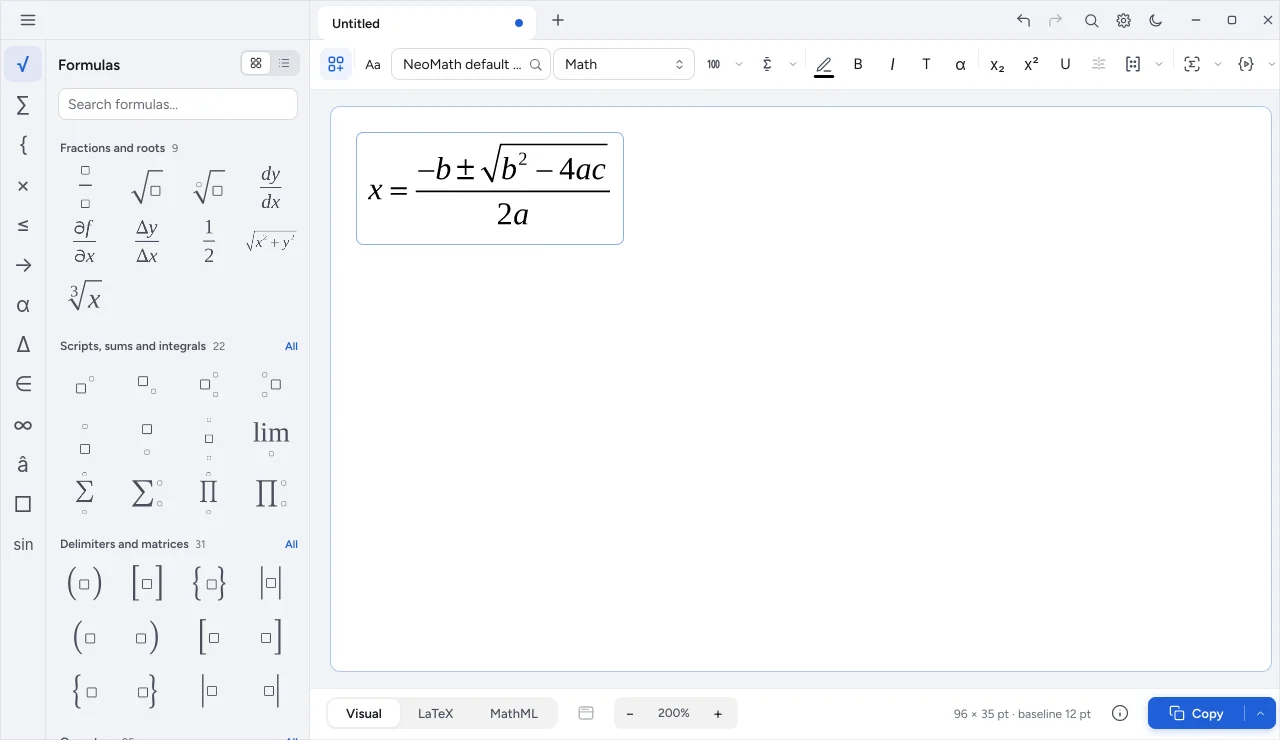
The palette shows each structure as it will look. Click, type or use shortcuts: the equation builds on the sheet and the preview always matches the final result.

NeoMath formula palette and editing sheet
The problem

Writing an equation shouldn't be a technical chore

  • Commands to memorize

    Anyone who doesn't write code loses time looking up how to type a fraction.

  • Result only at the end

    Finding the mistake after generating the file means starting over.

  • A different way in every tool

    Switching programs means relearning shortcuts and redoing equations.

In Neo's visual editor, you see the result while you write.

The solution

Quick for beginners, fast for experts

  • Searchable palette

    Categories, favorites and recents, in grid or list, with the real preview of each template.

  • Shortcuts

    Ctrl+F for a fraction, Ctrl+R for a root and a shortcut profile you can customize.

  • Command palette

    Ctrl+K finds any app action by name.

  • Tabs

    Several equations open, with a warning for unsaved changes.

  • Matrices

    Insert and adjust rows and columns without rebuilding the structure.

  • Inspector

    See the MathML, the LaTeX and the spoken reading of the equation alongside.

Three modes

Visual, LaTeX or MathML: your choice

Switch modes at the bottom at any time. What you write in one appears in the others, with no manual conversion.

  • Paste LaTeX and see the equation instantly
  • Copy as MathML for the web
  • Send to Word as an editable equation
NeoMath
Preview
x=−b±b2−4ac2a
LaTeX

Shall we talk about your production?

Tell us what your team publishes and we'll recommend the right plan and rollout.